
Employee Termination: What Gets De-provisioned and How Data Retention Works
When an employee leaves your organization, submitting a termination request promptly is critical for protecting company data, preventing unauthorized access, and ensuring you are not paying for unused licenses.
This article explains what gets de-provisioned when a termination request is submitted, what you can choose to retain, and how data retention works.
How to Submit a Termination Request
- Open our support request page
- Select Employee Departure as the request type
- Complete all required fields on the termination form (see below)
- Submit the request
Required Information
The following information is required on the termination form:
- First Name and Last Name of the departing employee
- Employee Email — the company email address assigned to the employee
- Termination Date — the employee's last day of employment
- Retain Hosted Resources? — Yes or No (see explanation below)
If you select Yes, the form also asks:
- Resources to Retain — what should be kept (see below)
- Add Automated Email Reply? — if Yes, the message senders should receive
- Does anyone need access to this employee's resources? — if Yes, who needs access and for how long
Other Information is optional — use it for any additional instructions.
What "Retain Hosted Resources" Means
The Retain Hosted Resources? field is the most important question on the termination form. It tells us how to handle cloud resources such as Microsoft 365, OneDrive, Dropbox, Adobe Creative Cloud, and similar services.
Here's the field on the form, and what each answer does.
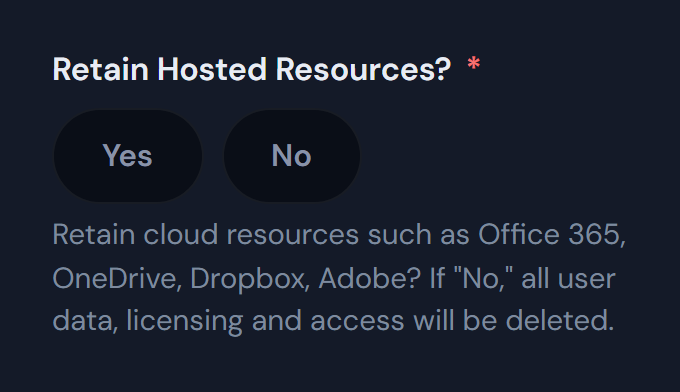
Hint on the form: if "No," all user data, licensing and access will be deleted.
Yes: you choose what we keep
- You list what to keep in Resources to Retain (see below).
- We preserve it first, for example by converting the mailbox to a shared mailbox.
- Only then do we remove the account.
No: everything is deleted
- The Microsoft 365 account, mailbox and OneDrive are deleted, along with any files stored only in the employee's cloud profile.
- Dropbox, Adobe and other licenses are reclaimed, and you stop being billed for them.
- A deleted account can be recovered only for a short time (typically 30 days for Microsoft 365). After that, the data is gone for good.
Not sure? Choose Yes. If there's any chance you'll need the employee's data, select Yes and list what to keep.
If You Select "Yes"
If you select Yes to retain hosted resources, please specifically note what you are requesting to retain in the Resources to Retain field. These can be such items as email, OneDrive, data stored on the computer, etc.
Common items to specify include:
- Email — convert the mailbox to a shared mailbox, forward to a manager, or export to PST
- OneDrive — transfer ownership to another user (typically the manager) or export the contents
- Data stored on the computer — copy files from the local profile before the device is wiped or reassigned
- Teams chats or channel files — preserve before the account is removed
- SharePoint sites or documents owned by the user — reassign ownership
- Adobe or other application data — files saved in third-party applications that need to be preserved
Example
Resources to Retain
Resource Access Notes
Resource Access Notes appears when you answer Yes to Does anyone need access to this employee's resources?
The more specific you can be, the faster we can complete the request and the less likely something important is missed.
What Gets De-provisioned
As soon as a termination request is submitted, our technicians will begin the de-provisioning process. Most requests are completed the same business day.
The standard de-provisioning steps include:
- Disabling the user's Microsoft 365 sign-in to immediately prevent further access
- Resetting the password and revoking active sessions and refresh tokens
- Removing the user from distribution lists, shared mailboxes, and security groups
- Disabling VPN and remote access
- Removing access to network shares and line-of-business applications
- Reclaiming SaaS licenses (Microsoft 365, Adobe, Dropbox, etc.) — unless retention is requested
- Wiping or collecting company-owned devices per your organization's policy
- Removing access to mobile devices enrolled in Mobile Device Management (MDM)
Based on what you select for Retain Hosted Resources, account deletion happens either immediately (if "No") or after the data you requested has been preserved (if "Yes").
High-Risk Terminations
If the separation is involuntary, contentious, or otherwise sensitive — for example, a termination for cause or where the employee may attempt to retaliate against company systems — please say so clearly at the top of the request so we can coordinate immediate access removal.
Need Help?
Not sure how to handle a specific employee's data? This often comes up with regulatory retention requirements, ongoing legal matters, or client-facing email that someone needs to take over. Note your concerns in the Other Information field, submit a support request, or email [email protected]. Our team will follow up before any deletion takes place.