
VPN — Install the CloudVPN Client
- What you get after install
- Check whether CloudVPN is already installed
- If the icon is present
- Managed company computers (most people)
- If you just got a new PC
- If you use a personal / BYOD computer
- If CloudVPN is not installed — request it
- After IT installs it — what to do next
- Still don’t see it after the ticket is closed?
- FAQ
- When to submit a ticket
- Related articles
CloudVPN shows up on your computer as Hamachi or LogMeIn Hamachi.
Which one sounds like you?
I can see Hamachi near the clock
You're installed. There's nothing to request.
Not sure it's Hamachi? See what to look for
I just got a new computer
Give it the first day to finish installing company software. Restart it once, then check again.
No Hamachi near the clock or in Start search
Submit a support request and ask us to install CloudVPN. Don't download Hamachi yourself.
Checked the hidden icons? How to check
What you get after install
When install finishes, you should have:
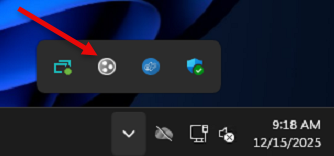
- A Hamachi / LogMeIn Hamachi icon near the clock (sometimes under the ^ hidden icons).
- A desktop shortcut named Network Access (sometimes after the first successful setup).
- The ability to Power On and reach company shares from outside the office.
Next article after this one: VPN — Power On / First-Time Setup (CloudVPN).
Check whether CloudVPN is already installed
If you cannot open network resources while working remote, confirm the client is present before you request a new install.
- Look near the Windows clock on the taskbar.
- Click the ^ arrow to show hidden icons.
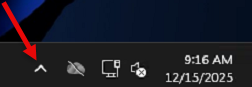
- Look for the Hamachi (LogMeIn) icon.
- Optional: open Start and search for Hamachi. If the app appears, it is installed even if the tray icon is hidden.
If the icon is present
You are installed. You do not need this article’s install request — go straight to Power On:
→ VPN — Power On / First-Time Setup (CloudVPN)
If Hamachi is installed but you still cannot open drives after Power On, use:
→ VPN — Can’t Connect or See Network Drives (CloudVPN)
Managed company computers (most people)
On computers The I.T. Experience manages, CloudVPN is automatically deployed. You should not need to run a setup wizard yourself.
If you just got a new PC
- Sign in and connect to the internet.
- Wait for routine company software to finish installing (this can take a while on first day).
- Restart once if you were asked to, or if a lot of software just finished installing.
- Check for the Hamachi icon again (including hidden icons and Start search).
- If it still is not there after that first-day settle period, request install (next section).
If you use a personal / BYOD computer
Personal Macs and home PCs are a different path. We only install CloudVPN where your firm’s policy allows it, and the steps may differ. Say clearly in your request that the device is personal / BYOD and which company resources you need. Do not install random VPN software from the internet while you wait.
If CloudVPN is not installed — request it
If you do not see the Hamachi icon and Start search finds nothing:
- Submit a support request.
- Ask for CloudVPN client installation (saying “Hamachi” is fine too — we know they are the same).
- Include your computer name if you know it, and whether this is a company PC or personal device.
- Our team will install and configure the client remotely on managed Windows PCs in most cases.
- When install is complete, you should see the Hamachi tray icon, and typically a Network Access shortcut on the desktop after setup.
After IT installs it — what to do next
When the ticket is closed (or we message you that install is done):
- Restart Windows if we asked you to — use Restart, not only Shut down.
- Show hidden icons near the clock and confirm Hamachi is present.
- Follow VPN — Power On / First-Time Setup (CloudVPN): right-click → Power On → wait ~30 seconds.
- Open the desktop Network Access shortcut if mapped drive letters do not appear.
Still don’t see it after the ticket is closed?
Try this short checklist before reopening the loop:
- Restart the computer once.
- Click ^ to show hidden icons — the tray icon is easy to miss.
- Search Start for
Hamachi. - Confirm you are on the same computer named in the ticket (laptops get mixed up in multi-PC households).
- If it is still missing, reply on the ticket or submit a new request and say: “CloudVPN install ticket closed, Hamachi still not visible after reboot and Start search.”
FAQ
Click a question to expand it.
Is CloudVPN the same as Hamachi / LogMeIn?
Yes. CloudVPN is our client-facing name. The software on your PC is labeled Hamachi or LogMeIn Hamachi. Same service. CloudVPN is how you reach office network drives, printers, and internal resources from home.
Do I need a separate CloudVPN password?
No. Your CloudVPN sign-in is the same username and password you use on your office computer.
Is this the same as Remote Desktop?
No. CloudVPN reaches network drives and printers. Remote Desktop / ScreenConnect puts you on an office PC’s screen. See Remote Access — ScreenConnect or Remote Access — macOS if you need the screen, not the file shares.
Can I install Hamachi myself from LogMeIn’s website?
Please don’t. A personal install will not join your company’s CloudVPN configuration correctly and often creates duplicate icons and dead ends. Request install through support so we can deploy the configured client.
I am on a Mac. Is this article for me?
This install path is written for the usual Windows CloudVPN client (Hamachi) on company PCs. If you need office resources from a Mac, say so in a support request — your firm may use a different approved method, or Remote Desktop to a Windows PC instead.
Websites work, but office folders do not. Do I need a reinstall?
Usually no. First confirm Hamachi is installed and powered on. Reinstall requests are for when the client is missing or corrupted — not for every “I can’t see the S: drive” moment. Start with Power On / First-Time Setup, then CloudVPN troubleshooting.
Will install interrupt my work?
Remote install is usually short. We may ask for a reboot. If you are in the middle of a presentation or large upload, tell us a good window in the ticket.
When to submit a ticket
Submit a support request if: Hamachi isn’t installed, Power On fails, Network Access is missing, or you can connect to CloudVPN but still can’t open the shares you need.
For a new install, please include:
- That you need CloudVPN / Hamachi installed
- Company PC or personal/BYOD
- Computer name (if known)
- Whether Start search for Hamachi finds anything
- Whether this is a brand-new computer