
Remote Desktop Notice: New Security Notice
Overview
After Microsoft's April 2026 Windows security update, Windows may display a new Remote Desktop warning when you open an .rdp file or a saved Remote Desktop shortcut. This is an expected Microsoft change and is intended to help protect users from phishing and unsafe Remote Desktop files.
The standard remote desktop connection shortcut looks like the icon below:
What you may see
The first time you open a Remote Desktop connection after the update, you may see a pop-up similar to "Opening Remote Desktop Connection" with a checkbox that says:
I understand and allow RDP files to open on this device for my account
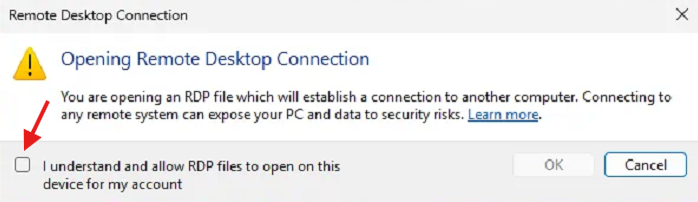
This educational prompt appears the first time you open an RDP file after the update, and after you allow it, it should not appear again for that account.
What this means
Microsoft introduced this warning because RDP files can request access to local resources such as your clipboard, drives, camera, or other redirected devices, and attackers can misuse malicious RDP files in phishing campaigns.
What you should do
If you opened Remote Desktop from your normal company shortcut, portal, or other expected source, and you recognize the destination system, you can check the box and select "OK" to continue.
When to stop and contact IT
Do not continue if any of the following are true:
- You were not expecting to open a Remote Desktop connection.
- You have issues connecting.