
Restarting Printer Services
In an instance where you are unable to print to one or more printers, it's highly recommended to restart your computer as the first step to resolve your issue.
In the rare case that restarting your system does not fully resolve your issue or you cannot restart at this given time, you can initiate a printer services refresh directly from our support app:
- In the bottom right of your taskbar, click the small Show hidden icons arrow (1) near the clock. Once the icons show, the arrow points down. If you already see our Support Agent icon next to the clock, skip to step 2.
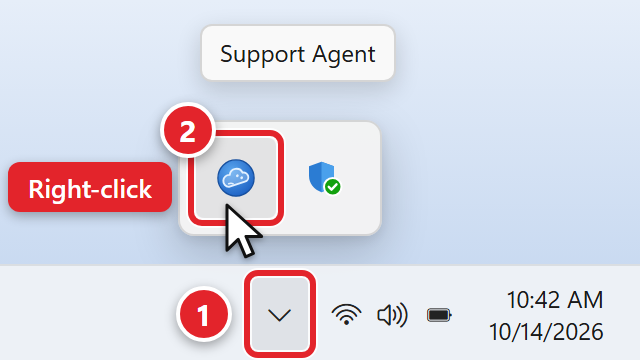
- Find our Support Agent icon (2). It is round and blue, and when you point at it, it says Support Agent. Right-click it and select "Restart Printer Services" from its menu. If you don't see Restart Printer Services in the menu, point to System Tools to see more options.
- Once you see the message "Printer Services Successfully Restarted", please wait 30 seconds and try to print again.
If you are still unable to print after restarting your computer and system printer services, please power cycle the printer by removing the power cable for 30 seconds and then plugging it back in. The printer can take 2–3 minutes to fully initialize and begin accepting print jobs.
If the above procedures do not resolve your issue, please submit a support request for us to assist.
Was this article helpful?