
Submitting a Support Request
Submitting a support request is an easy way to request a technician contact you to assist with any issues or requests.
The IT Experience provides 3 methods of submitting a support request:
Option 1: Website Submission
The recommended method for submitting a support case is from our website. This form captures all information needed to assist you as soon as possible.
To submit a support case via our website, visit https://theitexperience.com/supportrequest/ and provide all requested information.
Option 2: Support Agent Submission
If you are enrolled into one of our support plans, you can submit support cases directly from the agent that is installed on your computer. This option will redirect you to our online support request system.
To submit a support case via our support agent:
- Click the small Show hidden icons arrow (1) near your clock (Windows computers only). Once the icons show, the arrow points down. If you already see the support icon next to the clock, skip to step 2.
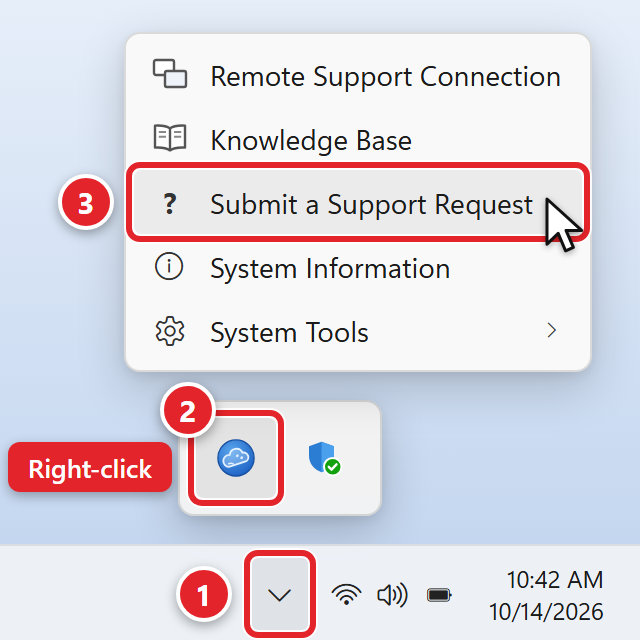
- Find the support icon (2). It is round and blue, and when you point at it, it says Support Agent. Right-click it.
- Select Submit a Support Request (3) to open the case submission window.
- Once selected, you will be redirected to our support request system.
Option 3: Email Submission
You can also submit a support case via email.
Email [email protected] with as much detail as possible. Be sure to provide what error you are receiving (if any) and any additional details regarding your request that will allow us to assist as efficiently as possible.