
Get Remote Support: Let Us Connect to Your Computer (Windows and Mac)
- Steps 1 to 3: Start the Session (Windows and Mac)
- Step 1: Go to Our Remote Support Page
- Step 2: Click the Arrow Next to "Start a New Session"
- Step 3: Type Your Name and Click "Start Session"
- On Windows: Steps 4 to 6
- Step 4: Open the File That Downloaded
- Step 5: Click "Run" If Windows Asks
- Step 6: Tick the Box and Click "Connect"
- While You're Connected (Windows)
- On a Mac: Steps 4 to 8
- Step 4: Click "Download App"
- Step 5: Open the App
- Step 6: Click "Open"
- Step 7: Let Us See Your Screen
- Step 8: Let Us Use the Mouse and Keyboard
- While You're Connected (Mac)
- While We're Working
- Is It Really Us? Stay Safe
- Having Trouble?
Sometimes the quickest fix is for us to see your screen. In a remote support session, one of our technicians connects to your computer securely and works on the problem while you watch. Starting one takes about two minutes on Windows or a Mac.
The short version
- Go to theitexperience.com/helpme
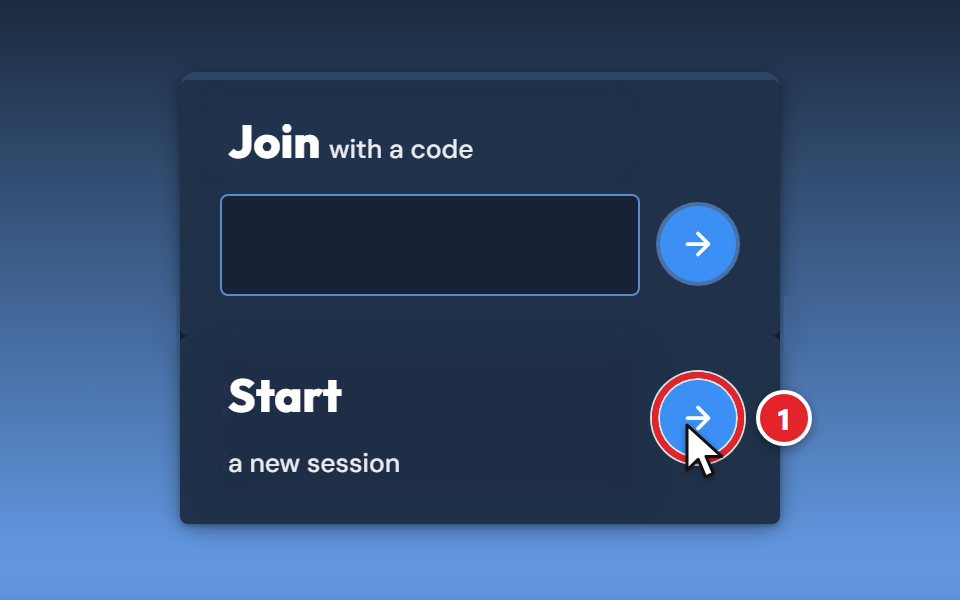
- Click the arrow next to Start a new session
- Type your name and click Start Session
- Open the small app that downloads and allow the connection: see the Windows steps or the Mac steps
Steps 1 to 3 are the same on both. The red numbers in each picture show what to click, in order.
Steps 1 to 3: Start the Session (Windows and Mac)
Step 1: Go to Our Remote Support Page
Open your web browser (Edge, Chrome, Safari or Firefox), type theitexperience.com/helpme in the address bar at the top, and press Enter. Our Start a Remote Session page opens.
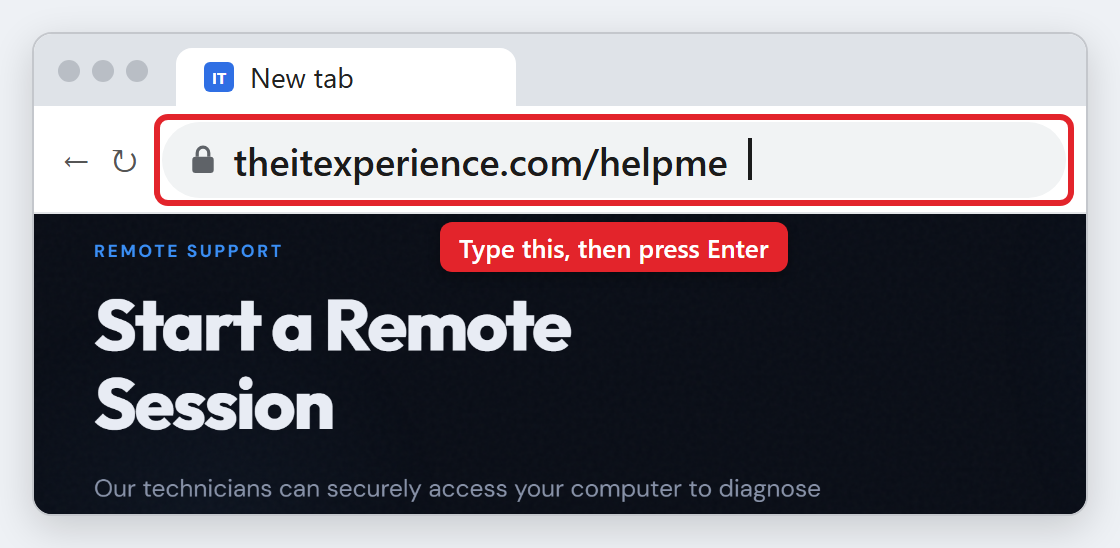
Already on our website? Choose Connect > Remote Support in the menu at the top, or click Get Remote Support Now at the bottom of any page.
Step 2: Click the Arrow Next to "Start a New Session"
Scroll down to the Initiate Remote Support box and click the arrow next to Start a new session (1).
Step 3: Type Your Name and Click "Start Session"
Type your first and last name (1) so we know who's waiting, then click START SESSION (2).
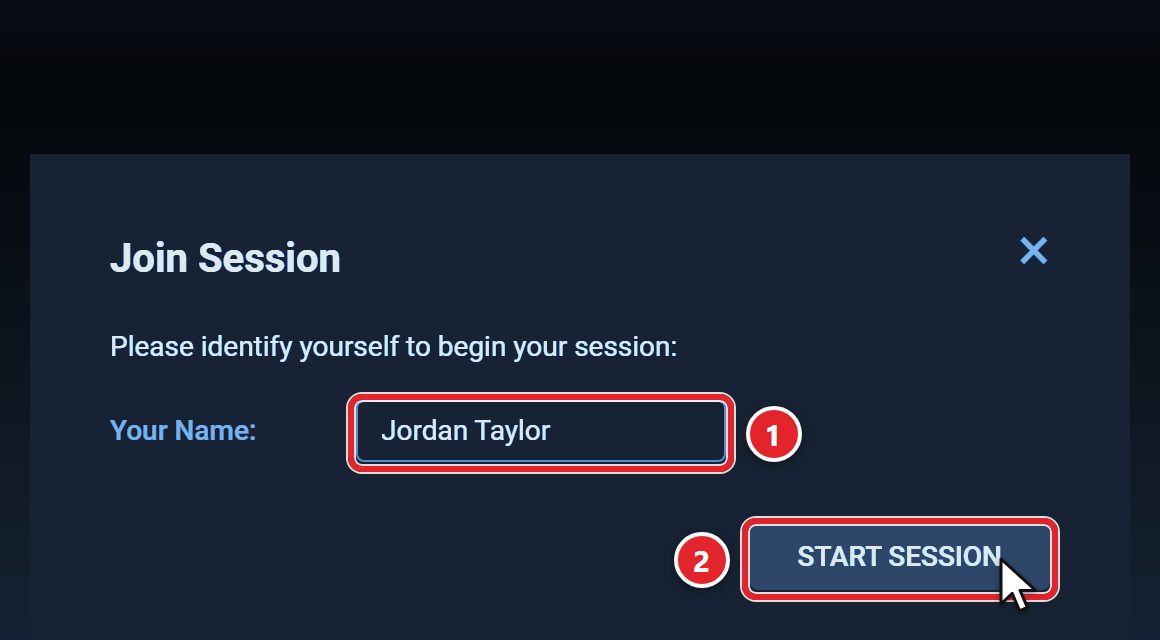
The box changes to Joining your session and a small app starts to download. Leave the page open and follow the steps for your computer.
On Windows: Steps 4 to 6
Step 4: Open the File That Downloaded
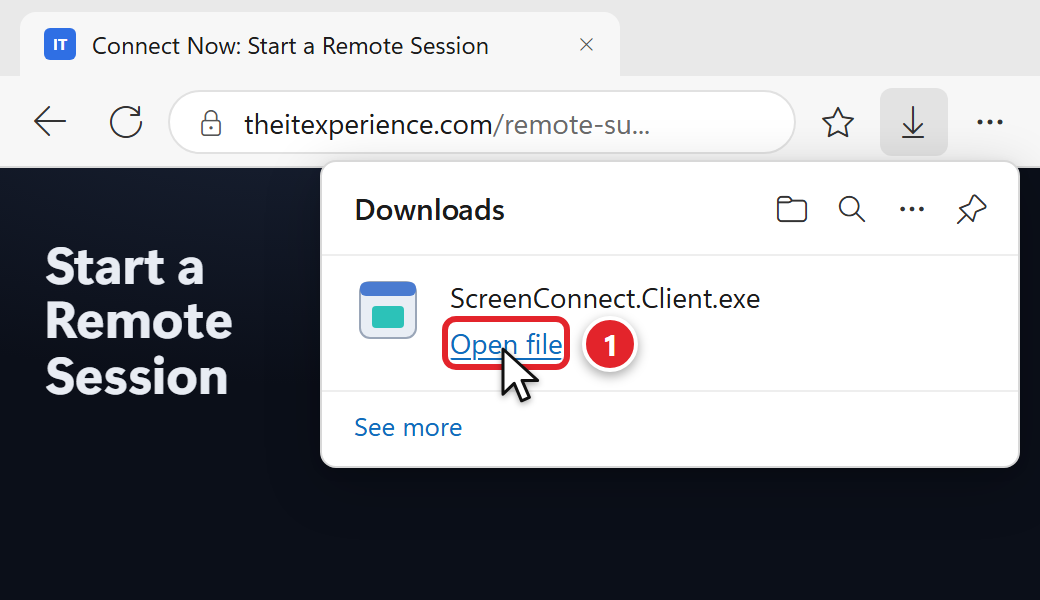
Your browser downloads a small file called ScreenConnect.Client.exe.
- Microsoft Edge: the Downloads list opens at the top right. Click Open file (1) under ScreenConnect.Client.exe. If the list has closed, click the download arrow at the top right to open it again.
- Google Chrome: click the download arrow at the top right, then click ScreenConnect.Client.exe.
- Firefox: if it asks, choose Save File. Then click the download arrow at the top right and click the file.
Step 5: Click "Run" If Windows Asks
A small Launching Application box may flash up while Windows checks the app. That's normal, and it closes by itself.
If a box titled Application Run - Security Warning appears, check that it says ScreenConnect Client, then click Run.
You won't need an administrator password. If Windows asks for one, stop and let us know in your ticket.
Step 6: Tick the Box and Click "Connect"
ScreenConnect asks Are you sure you want to allow access to your machine? This is your final check that you know who's connecting. If it's us, tick I acknowledge that I am allowing someone to connect to and control my machine (1), then click Connect (2).
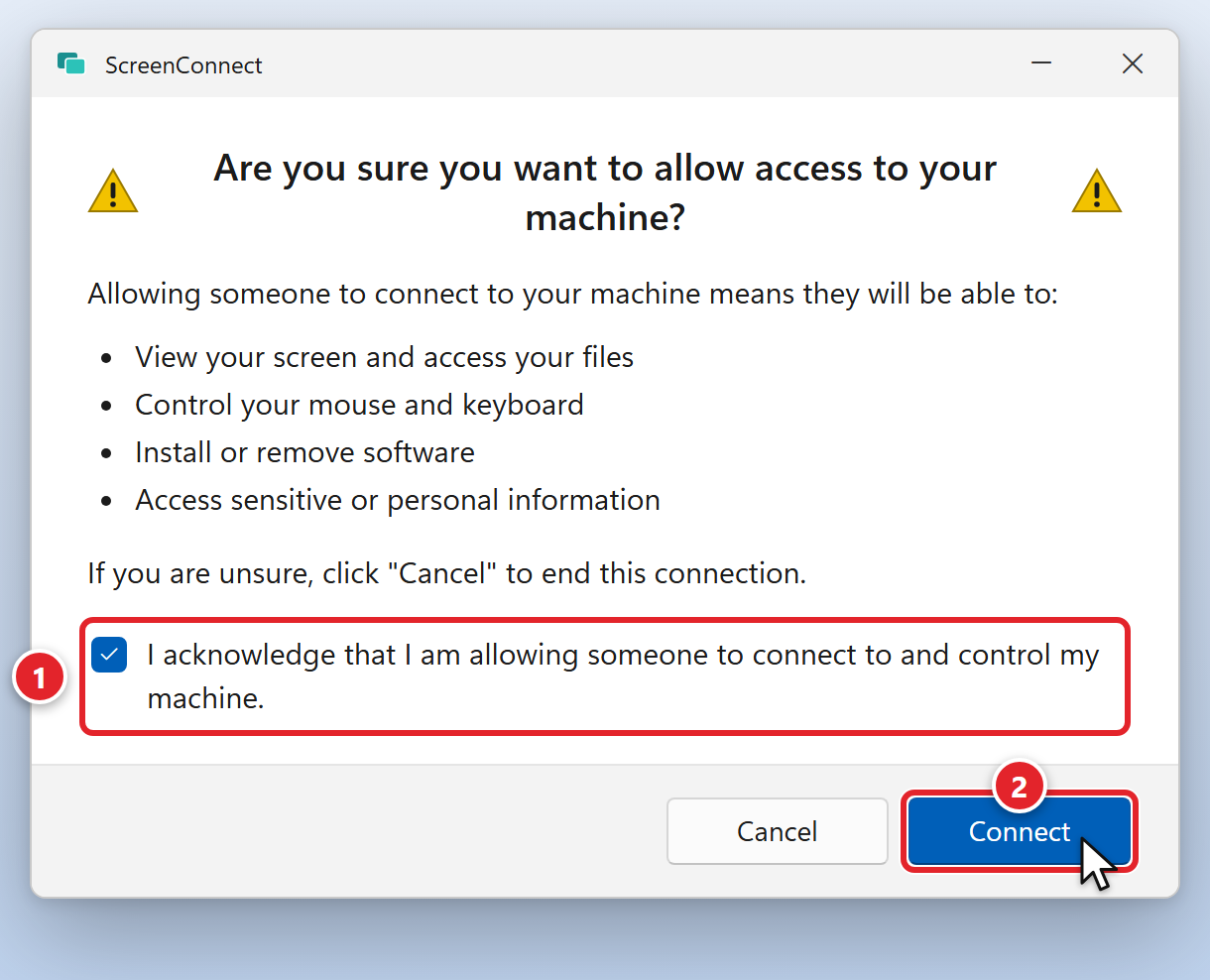
That's it, you're connected. Your technician will join you in a moment.
While You're Connected (Windows)
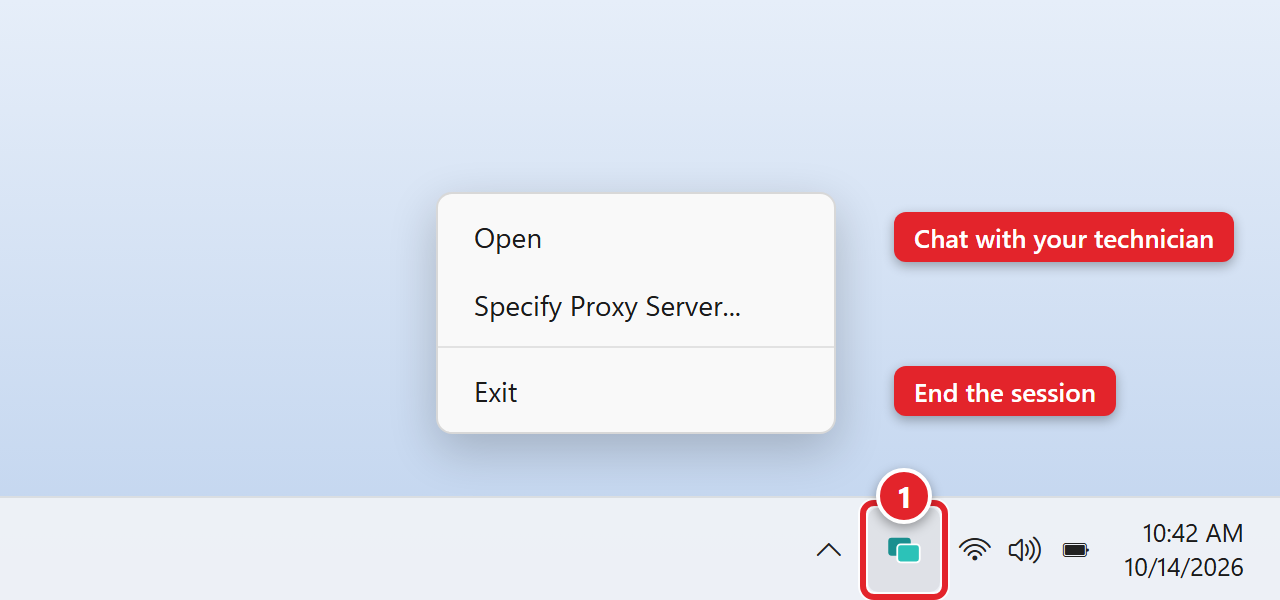
- A ScreenConnect icon appears near the clock (1). If you don't see it, click the small up arrow (^) next to the clock.
- When your technician takes over, a bar at the top of your screen says your computer is being controlled, and you'll see the mouse move by itself.
- To chat with your technician, right-click the ScreenConnect icon and choose Open.
- To end the session at any time, right-click the icon and choose Exit.
On a Mac: Steps 4 to 8
The first time, your Mac asks for two permissions, so there are a few extra clicks. You'll only need your Mac's login password.
Step 4: Click "Download App"
In the Join Session box, click Download App (1).
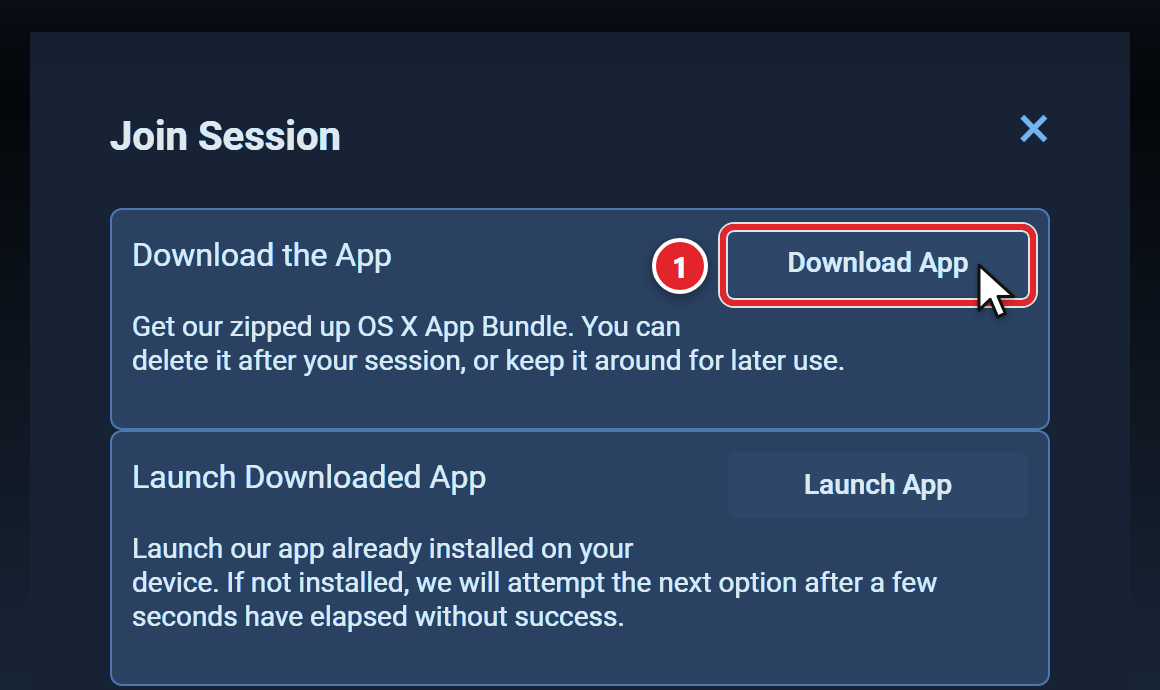
Kept the app from an earlier session? Click Launch App instead. If both permissions in steps 7 and 8 are already on, you're connected.
Step 5: Open the App
- Safari: click the Downloads button (the arrow) at the top right of the Safari window, then double-click ScreenConnect Client. Safari unzips the download for you.
- Chrome: click the download at the top right. A Finder window opens; double-click ScreenConnect Client.
- Can't find it? Open Finder, click Downloads and double-click ScreenConnect Client. If you only see ScreenConnect.Client.zip, double-click that first.
On some Macs the app is called ConnectWise Control Client. It's the same app.
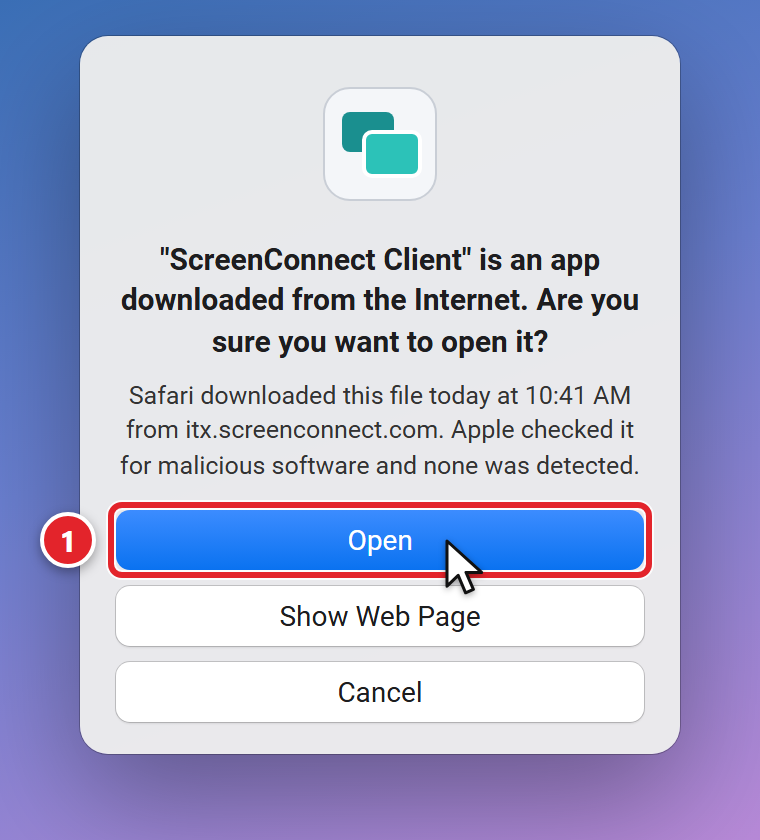
Step 6: Click "Open"
Your Mac checks the app and asks if you're sure you want to open it. Click Open (1).
Step 7: Let Us See Your Screen
ScreenConnect opens a Review System Access window with two permissions, Screen Recording and Accessibility. Your Mac needs both before we can help.
- Under Screen Recording, click Request Access.... If your Mac shows a message about recording your screen, click Open System Settings.
- On the Screen & System Audio Recording page, turn on the switch for ScreenConnect (1). It may be listed as connectwisecontrol- followed by letters and numbers.
- Enter your Mac's login password if asked.
- When your Mac says the app may not be able to record your screen until it quits, click Quit & Reopen (2). ScreenConnect restarts by itself.
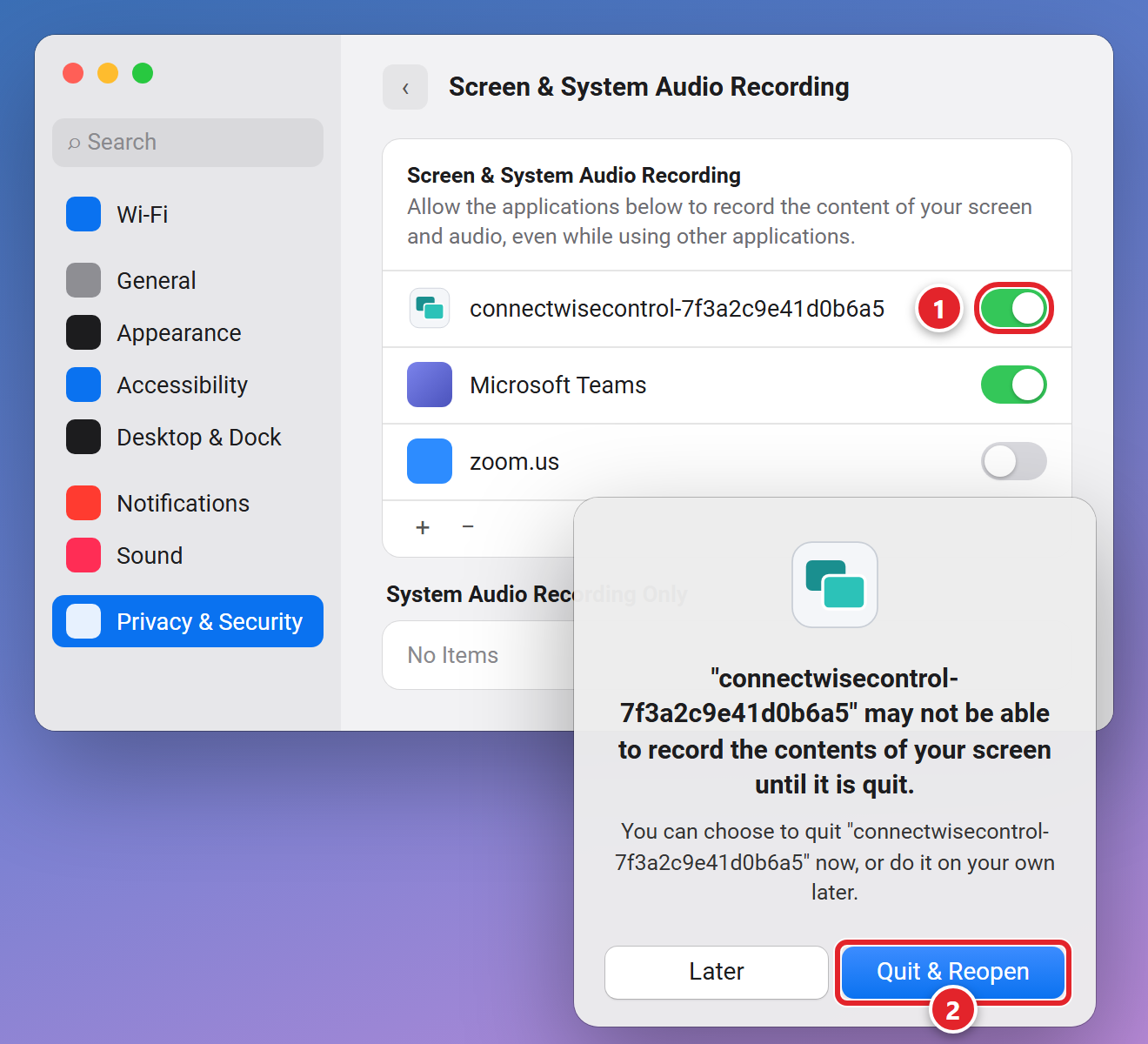
Not in the list? Click the + button under the list, go to Downloads, select ScreenConnect Client and click Open. If ScreenConnect doesn't reopen by itself, double-click it in your Downloads folder again.
Step 8: Let Us Use the Mouse and Keyboard
- Back in the Review System Access window, click Request Access... under Accessibility.
- On the Accessibility page in Privacy & Security, turn on the same ScreenConnect switch. It looks just like the step 7 picture.
- Enter your password if asked.
Both permissions now show a green Granted. That's it, you're connected.
While You're Connected (Mac)
- When your technician takes over, a bar on your screen says your computer is being controlled, and you'll see the mouse move by itself.
- To end the session at any time, click and hold the ScreenConnect icon in the Dock and choose Quit.
- Afterwards you can drag ScreenConnect Client from Downloads to the Trash, or keep it for next time and use Launch App in step 4.
While We're Working
- Close anything private first, such as personal email or banking, before you start the session.
- Stay nearby. We may need you to sign in to something or answer a quick question.
- Let us drive. Try not to move the mouse or type while we're working. It's like two people steering one car.
- You're in control. You can watch everything we do and end the session at any time.
Is It Really Us? Stay Safe
Scammers use the same kind of remote support software we do, so what's on your screen can't tell you who's on the other end. Who started the conversation can.
- Support from us always begins with you. You submit a request, and we connect only with your knowledge and permission. Every session is logged.
- Always start from our website, theitexperience.com/helpme. Never start a session from a pop-up, an email link or a phone call you weren't expecting.
- A warning that shows a phone number is a scam. Don't call it, and don't let anyone connect.
- On Windows you'll never need an administrator password to let us in. If you're asked for one, stop.
Having Trouble?
Click a question to expand it.
Nothing downloaded after I clicked Start Session.
Check the download arrow at the top right of your browser first; the file may already be there. Still nothing? In the Join Session box, click Try next option under Having trouble?, or start again from step 1 in a different browser.
My browser or antivirus blocked the file.
If your browser asks, choose Keep, but only for the file you just downloaded from our page. If your antivirus removed it, don't turn the antivirus off. Reply to your ticket and tell us, and we'll help you another way.
Windows asked for an administrator password.
Stop there, and don't type in anyone else's password. Joining a session never needs one. Reply to your ticket and let us know what you saw.
I'm on a Mac and the technician can't see my screen or can't click anything.
My technician gave me a code.
I closed it by accident.
No problem. Start again from step 1 and let your technician know in your ticket.
My technician asked me to use Quick Assist instead.
Quick Assist is built into Windows. Follow Remote Support — Windows Quick Assist and enter the code your technician gives you.
Can I use my phone or tablet?
This guide is for Windows computers and Macs. If you need help with a phone or tablet, submit a support request and tell us what's going on.
Do I need to remove anything afterwards?
No. On Windows you can delete ScreenConnect.Client.exe from your Downloads folder. On a Mac you can drag ScreenConnect Client from Downloads to the Trash, or keep it for next time.